
Affine#
Overview#
The affine module in SplineOps provides
affine geometric transforms for 2-D or 3-D spatial data using spline
interpolation. splineops.affine.affine_transform() accepts a general
pull-back matrix and offset, splineops.affine.rotate() constructs rotation
geometry, and splineops.affine.AffinePlan reuses fixed geometry across
frames. Such operations are widely used in image processing, computer
graphics, and scientific computing [1].
2D Rotation#
In 2D space, a point of coordinates \((x, y)\) can be rotated around a center point \((x_\mathrm{c}, y_\mathrm{c})\) by an angle \(\theta\) (in radians) using the rotation matrix.
Here, \((x', y')\) are the coordinates of the rotated point.
3D Rotation#
For 3D data, a point \(\mathbf{v} = (x, y, z)\) can be rotated around an arbitrary axis defined by a unit vector \(\mathbf{u} = (u_\mathrm{x}, u_\mathrm{y}, u_\mathrm{z})\) by an angle \(\theta\) using Rodrigues’ rotation formula
Alternatively, the rotation can be expressed with the rotation matrix
The rotated point is calculated as
Affine Transformation by Resampling#
The rotated coordinates may not coincide with the original data grid, so spline interpolation is employed for the resampling of the rotated data. The approach documented here uses standard interpolation, which leverages tensor-product B-splines for smooth, accurate results across multiple dimensions while minimizing artifacts like aliasing. The process asks one to first recenter the coordinates so that the rotation center coincides with the origin, then to apply the appropriate 2D or 3D rotation matrix to the recentered coordinates, followed by a translation of the rotated recentered coordinates back to their original reference frame, to compensate for the recentering step, and finally to use spline interpolation to determine the data values at these new positions.
affine_transform follows the pull-back convention
\(x_\mathrm{input}=A x_\mathrm{output}+b\). rotate builds that geometry
about the array center by default, or about an explicit center in array-axis
coordinates. Rotation keeps the spatial input shape; a general affine
transform may request another spatial output shape. The default boundary mode
is "zero"; pass mode="mirror" for whole-sample mirror extension.
Degrees 0 through 7 are supported. Degrees 0 through 5 in two and three
dimensions are tested against equivalently configured
scipy.ndimage.affine_transform (SciPy’s maximum spline order is 5).
One-shot coordinates are generated in bounded tiles rather than as a complete
stacked volume.
General and repeated transforms#
Use the function for one transform and a plan when geometry is reused:
import numpy as np
from splineops.affine import AffinePlan, affine_transform

matrix = np.array([[1.0, 0.15], [0.0, 1.0]])
offset = np.array([-4.0, 0.0])
first = affine_transform(
    image,
    matrix,
    offset,
    degree=3,
    mode="mirror",
)

plan = AffinePlan(
    image.shape,
    matrix,
    offset,
    degree=3,
    mode="mirror",
    max_retained_bytes=256 * 1024**2,
)
output = np.empty(image.shape, dtype=np.float64)
plan.apply(next_image, out=output)
The ordinary plan call retains support indexes and weights but still performs
the spline coefficient prefilter required by each new frame. If one frame is
sent through several compatible affine geometries, call
prepare_coefficients once and pass its result to each plan’s
apply_coefficients method:
field = plan.prepare_coefficients(frame)
first = plan.apply_coefficients(field)
second = another_compatible_plan.apply_coefficients(field)
An splineops.affine.AffineCoefficientField is immutable and records
the input shape, spatial axes, degree, boundary mode, and precision. Applying
it through an incompatible plan fails explicitly. Matrix and output shape are
not part of the coefficient contract, which is exactly what permits reuse
across affine geometries. prefilter continues to return a raw array and
supports out= for lower-level workflows, but raw arrays cannot carry a
provenance check. Tagged fields can be persisted without object pickles and
validated on load:
field.save("frame-coefficients.npz")
restored = another_compatible_plan.load_coefficients(
    "frame-coefficients.npz"
)
The schema-2 archive stores portable little-endian numeric values and JSON
metadata. Saving flushes a same-directory temporary file and then atomically
replaces the destination, so an interrupted write cannot partially update an
existing field. Loading checks its schema, input shape, spatial axes, degree,
canonical boundary implementation, and precision against the receiving plan;
schema-1 archives remain readable. Immutable fields and plans may be reused
concurrently by threads or loaded independently by spawned processes; each
application allocates or writes only its own output.
See
Reusable workflow recipes and Stability-soak workflows for complete
examples. Set
cache_geometry=False for bounded-memory streaming with no retained query
geometry. Plan construction raises MemoryError rather than exceeding
max_retained_bytes for geometry storage.
retained_bytes includes both cached geometry and the reusable spline
template; geometry_retained_bytes and template_retained_bytes report
the components. configuration returns a copy of the fixed numerical
contract.
Batch and channel axes#
For an array with non-spatial dimensions, select exactly two or three
spatial_axes. Every remaining slice is transformed independently in the
mathematical sense, while coefficient filtering and support evaluation operate
on the batch together with memory-bounded query tiles:
# NCHW data: rotate the height and width axes of every batch/channel plane.
rotated = rotate(batch, 12.0, spatial_axes=(-2, -1), mode="mirror")
TensorSpline itself remains a scalar continuous N-D model; affine owns this
batch/channel orchestration so the module boundaries stay clear.
Note
The geometry of the transform (center, axis, angle) is identical across methods; what changes is the spline used for resampling. Different spline degrees trade sharpness for smoothness (e.g., degree 0/nearest → blocky but fast; degree 1/linear → slight blur; degree 3/cubic → smoother, higher-quality edges).
Note
This module favors a clear spline contract and integration with
TensorSpline. It is currently substantially slower than SciPy’s
specialized affine kernels on the matched benchmark, even though cached
geometry materially improves repeated SplineOps execution; see
Performance evidence. SplineOps does not present affine transforms as a
universal speed advantage.
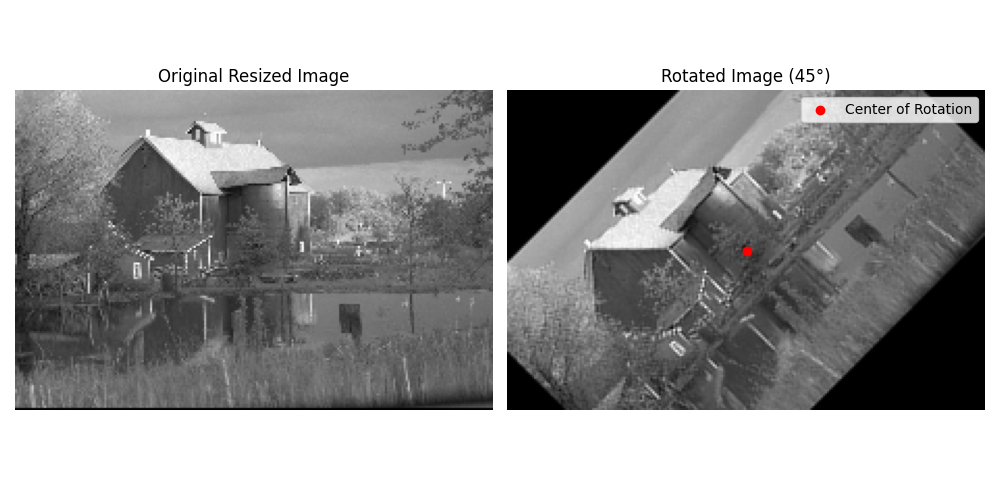
The following figure from Rotate Image shows an image rotated around a user-defined center using cubic interpolation. The red marker indicates the chosen center of rotation.
Rotation Animation#
Here a more comprehensive animation exported from the example Rotation Animation, using different values of rotation angles and spline degrees.