Rotation Animation#
We use the rotate module to rotate a 2D image.
Imports#
import numpy as np
import matplotlib.pyplot as plt
from matplotlib import animation
from splineops.affine.affine import rotate
from splineops.resize.resize import resize
from urllib.request import urlopen
from PIL import Image
Load and Preprocess the Image#
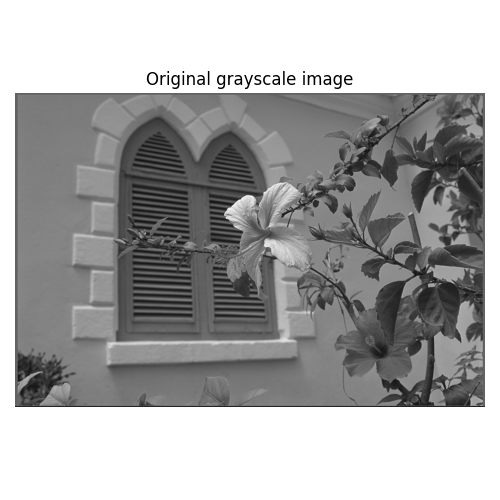
Load a Kodak image, convert it to grayscale, normalize it, and then resize it by a factor of (0.5, 0.5). After that, scale its intensity back to [0, 255] before rotation.
# Load the image
url = "https://r0k.us/graphics/kodak/kodak/kodim07.png"
with urlopen(url, timeout=10) as resp:
    img = Image.open(resp)
data = np.array(img, dtype=np.float64)

# Convert to grayscale using a standard formula
data_gray = data[:, :, 0] * 0.2989 + data[:, :, 1] * 0.5870 + data[:, :, 2] * 0.1140

# Show the original grayscale image
plt.figure(figsize=(5, 5))
plt.imshow(data_gray, cmap="gray", vmin=0, vmax=255)
plt.title("Original grayscale image")
plt.axis("off")
plt.tight_layout()
plt.show()

# Normalize the grayscale image to [0,1]
data_normalized = data_gray / 255.0

# Define zoom factors for resizing
zoom_factors = (0.3, 0.3)
interp_method = "cubic"

# Resize the image using spline interpolation (this returns image in [0,1])
image_resized = resize(data_normalized, zoom_factors=zoom_factors, method=interp_method)

# Bring the resized image back to [0,255]
image_resized = (image_resized * 255.0).astype(np.float32)

# Use the center of the resized image as the custom center of rotation
custom_center = (image_resized.shape[0] // 2, image_resized.shape[1] // 2)
radius = min(image_resized.shape) // 2
Create an Animation#
Create the animation of the image being rotated from 0 to 360 degrees. Explore the effect of the spline degree.
ROTATION_STEP_DEG = 5
INTERVAL_MS = 250


def rotate_and_mask(image, angle, degree, center, radius):
    rotated = rotate(image, angle=angle, degree=degree, center=center)
    rows, cols = rotated.shape
    rr, cc = np.ogrid[:rows, :cols]
    mask = (rr - center[0]) ** 2 + (cc - center[1]) ** 2 <= radius**2
    # We'll return both the rotated image and the mask so we can use the mask as alpha.
    return rotated, mask


def create_combined_animation(image, center, radius):
    """
    Build a 3-panel rotation demo that shows spline degrees 0, 1 and 3.

    Parameters
    ----------
    image  : 2D np.ndarray
        Grayscale image in the range [0, 255].
    center : tuple[int, int]
        (row, col) coordinates of the rotation centre.
    radius : int
        Pixel radius of the circular area we want to keep visible.
    """
    # ------------------------------------------------------------------
    # 1.  Figure and axes
    # ------------------------------------------------------------------
    fig, axes = plt.subplots(
        nrows=3,
        ncols=1,
        figsize=(4, 12),  # a bit narrower than (6, 18)
        constrained_layout=True,
    )
    degrees = [0, 1, 3]

    # Pre‑compute the square that bounds the circle
    x0, x1 = center[1] - radius, center[1] + radius
    y0, y1 = center[0] - radius, center[0] + radius  # note y inverted later

    for ax, d in zip(axes, degrees):
        ax.set_title(f"Spline degree {d}", fontsize=12, pad=8)
        ax.set_xlim(x0, x1)
        ax.set_ylim(y1, y0)  # invert y so (0,0) is top‑left
        ax.set_aspect("equal")
        ax.axis("off")

    # ------------------------------------------------------------------
    # 2.  Empty image artists (one per axis)
    # ------------------------------------------------------------------
    image_artists = [
        ax.imshow(
            np.zeros_like(image),  # full‑sized buffer (fastest, no re‑alloc)
            cmap="gray",
            vmin=0,
            vmax=255,
        )
        for ax in axes
    ]

    # ------------------------------------------------------------------
    # 3.  Animation driver
    # ------------------------------------------------------------------
    rotation_step = ROTATION_STEP_DEG  # ° per frame
    interval_ms = INTERVAL_MS  # interval in ms
    total_frames = 360 // rotation_step  # one full revolution

    def animate(frame):
        angle = frame * rotation_step
        for artist, deg in zip(image_artists, degrees):
            rotated, mask = rotate_and_mask(
                image,
                angle=angle,
                degree=deg,
                center=center,
                radius=radius,
            )
            artist.set_data(rotated)
            artist.set_alpha(mask.astype(float))
        return image_artists

    return animation.FuncAnimation(
        fig,
        animate,
        frames=total_frames,
        interval=interval_ms,
        blit=True,
    )


# Create the animation
ani = create_combined_animation(image_resized, center=custom_center, radius=radius)
Export the Animation#
Writes into: <sphinx outdir>/_static/animations/ Does nothing when the file is run normally by users.
from splineops.utils.sphinx import export_animation_mp4_and_html

export_animation_mp4_and_html(
    ani,
    stem="rotation_animation",
    interval_ms=INTERVAL_MS,
    dpi=80,
    force=True,
)
(PosixPath('/home/runner/work/splineops/splineops/docs/_build/_generated_static/animations/rotation_animation.mp4'), PosixPath('/home/runner/work/splineops/splineops/docs/_build/_generated_static/animations/rotation_animation.html'))
Total running time of the script: (0 minutes 40.375 seconds)
