
Class TensorSpline#
Showcase TensorSpline class basic functionality.
Imports#
import numpy as np
import matplotlib.pyplot as plt
from splineops.spline_interpolation.tensor_spline import TensorSpline
Data Preparation#
General configuration and sample data.
dtype = "float32"

nx, ny = 2, 5
xmin, xmax = 0, 2.0
ymin, ymax = 0, 5.0
xx = np.linspace(xmin, xmax, nx, dtype=dtype)
yy = np.linspace(ymin, ymax, ny, dtype=dtype)
coordinates = xx, yy
prng = np.random.default_rng(seed=5250)
data = prng.standard_normal(size=tuple(c.size for c in coordinates))
data = np.ascontiguousarray(data, dtype=dtype)
TensorSpline Setup#
Configure bases and modes for TensorSpline.
bases = "bspline3"
modes = "mirror"
tensor_spline = TensorSpline(
    data=data, coordinates=coordinates, bases=bases, modes=modes
)
Evaluation Coordinates#
Define evaluation coordinates to extend and oversample the original grid.
Interpolation and Visualization#
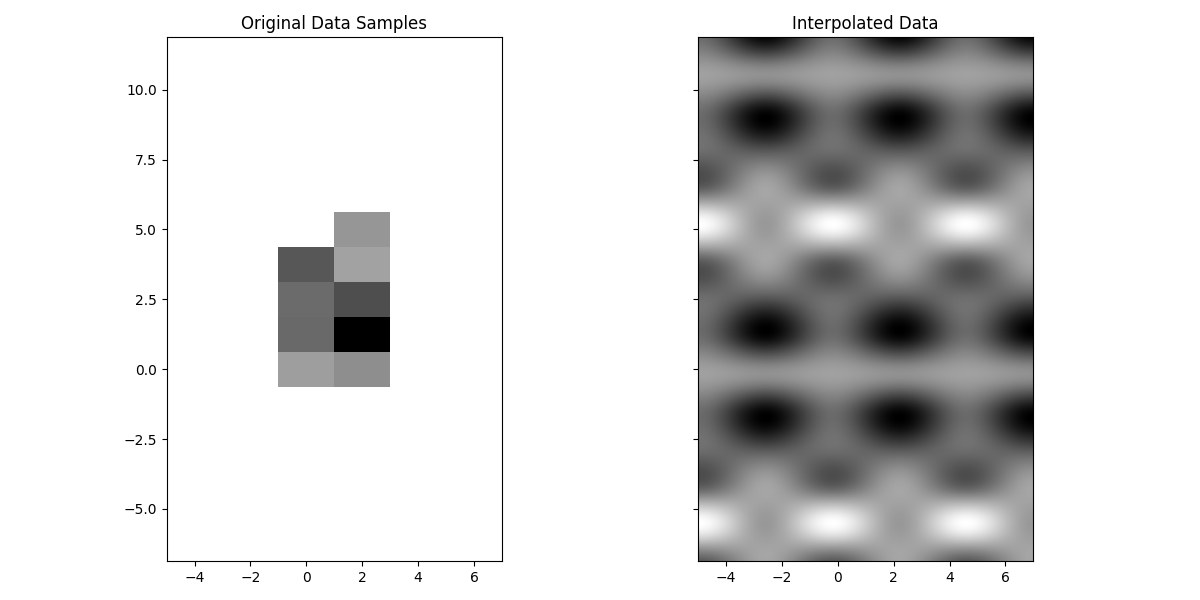
Perform interpolation and visualize the original and interpolated data.
data_eval = tensor_spline(coordinates=eval_coords)

extent = [xx[0] - dx / 2, xx[-1] + dx / 2, yy[0] - dy / 2, yy[-1] + dy / 2]
eval_extent = [
    eval_xx[0] - dx / 2,
    eval_xx[-1] + dx / 2,
    eval_yy[0] - dy / 2,
    eval_yy[-1] + dy / 2,
]

fig, axes = plt.subplots(nrows=1, ncols=2, figsize=(12, 6), sharex="all", sharey="all")
axes[0].imshow(data.T, extent=extent, cmap="gray", aspect="equal")
axes[0].set_title("Original Data Samples")
axes[1].imshow(data_eval.T, extent=eval_extent, cmap="gray", aspect="equal")
axes[1].set_title("Interpolated Data")
plt.tight_layout()
plt.show()
Experimental CuPy probe#
This example probes the current TensorSpline CuPy interoperability when
CuPy and a CUDA device are available. It is not a supported-backend or
device-residency claim: some boundary paths can transfer through CPU code,
and the full basis/mode matrix is not covered by dedicated GPU CI.
def _has_cuda_device() -> bool:
    try:
        import cupy as cp

        if cp.cuda.runtime.getDeviceCount() <= 0:
            return False
        return True
    except Exception:
        return False


try:
    import cupy as cp

    HAS_CUPY = True
except ImportError:
    HAS_CUPY = False

if not HAS_CUPY or not _has_cuda_device():
    print("Experimental CuPy probe skipped (no CUDA device).")
else:
    try:
        # Convert existing data/coordinates to CuPy
        data_cp = cp.asarray(data)
        coords_cp = tuple(cp.asarray(c) for c in coordinates)

        # Create CuPy-based spline
        ts_cp = TensorSpline(
            data=data_cp, coordinates=coords_cp, bases=bases, modes=modes
        )

        # Convert evaluation coordinates to CuPy
        eval_coords_cp = tuple(cp.asarray(c) for c in eval_coords)

        # Evaluate on the GPU
        data_eval_cp = ts_cp(coordinates=eval_coords_cp)

        # Compare with NumPy evaluation (from the CPU TensorSpline)
        data_eval_cp_np = cp.asnumpy(data_eval_cp)
        diff = data_eval_cp_np - data_eval
        print(f"Max abs diff (CPU vs GPU): {np.max(np.abs(diff)):.3e}")
        print(f"MSE (CPU vs GPU): {np.mean(diff**2):.3e}")
    except Exception as e:
        print(f"Experimental CuPy probe skipped after a runtime error: {e}")
Experimental CuPy probe skipped (no CUDA device).
Total running time of the script: (0 minutes 0.242 seconds)
