
2D Image Smoothing#
We use the smooth module to smooth a 2D grayscale image, with strong visible noise.
Imports#
import numpy as np
import matplotlib.pyplot as plt
from splineops.smoothing_splines.smoothing_spline import smoothing_spline_nd
2D Image Smoothing#
from urllib.request import urlopen
from PIL import Image


def create_image():
    """
    Loads a real image and converts it to grayscale.
    """
    url = "https://r0k.us/graphics/kodak/kodak/kodim06.png"
    with urlopen(url, timeout=10) as resp:
        # Force grayscale (L = luminance)
        img = Image.open(resp).convert("L")

    data = np.array(img, dtype=np.float64)
    data /= 255.0  # Normalize to [0, 1] grayscale

    return data


def add_noise(img, snr_db):
    """
    Adds Gaussian noise to the image based on the desired SNR in dB.
    """
    signal_power = np.mean(img**2)
    sigma = np.sqrt(signal_power / (10 ** (snr_db / 10)))
    noise = np.random.randn(*img.shape) * sigma
    noisy_img = img + noise

    # Keep within [0, 1] for nicer display
    noisy_img = np.clip(noisy_img, 0.0, 1.0)

    return noisy_img


def compute_snr(clean_signal, noisy_signal):
    """
    Compute the Signal-to-Noise Ratio (SNR).

    Parameters:
    clean_signal (np.ndarray): Original clean signal.
    noisy_signal (np.ndarray): Noisy signal.

    Returns:
    float: SNR value in decibels (dB).
    """
    signal_power = np.mean(clean_signal**2)
    noise_power = np.mean((noisy_signal - clean_signal) ** 2)
    snr = 10 * np.log10(signal_power / noise_power)
    return snr


def demo_image():
    # Parameters
    lambda_ = 0.1  # Regularization parameter
    gamma = 2.0  # Order of the spline operator

    # Noise
    snr_db = 8.0

    # Load grayscale image
    img = create_image()

    # Add noise
    noisy_img = add_noise(img, snr_db)

    # Smooth the noisy image
    smoothed_img = smoothing_spline_nd(noisy_img, lambda_, gamma)

    # Clip for display and SNR computation
    smoothed_img = np.clip(smoothed_img, 0.0, 1.0)

    # Compute SNRs
    snr_noisy = compute_snr(img, noisy_img)
    snr_smooth = compute_snr(img, smoothed_img)
    snr_improvement = snr_smooth - snr_noisy

    print("Image:")
    print(f"SNR of noisy image: {snr_noisy:.2f} dB")
    print(f"SNR after smoothing: {snr_smooth:.2f} dB")
    print(f"SNR improvement: {snr_improvement:.2f} dB\n")

    # Visualization for image
    plt.figure(figsize=(12, 4))

    # Original grayscale image
    plt.subplot(1, 3, 1)
    plt.imshow(img, cmap="gray", vmin=0, vmax=1)
    plt.title("Original Grayscale Image")
    plt.axis("off")

    # Noisy image
    plt.subplot(1, 3, 2)
    plt.imshow(noisy_img, cmap="gray", vmin=0, vmax=1)
    plt.title(f"Noisy Image (SNR={snr_noisy:.2f} dB)")
    plt.axis("off")

    # Smoothed grayscale image
    plt.subplot(1, 3, 3)
    plt.imshow(smoothed_img, cmap="gray", vmin=0, vmax=1)
    plt.title(f"Smoothed Image (SNR={snr_smooth:.2f} dB)")
    plt.axis("off")

    plt.tight_layout()
    plt.show()


# Run the image demo
demo_image()
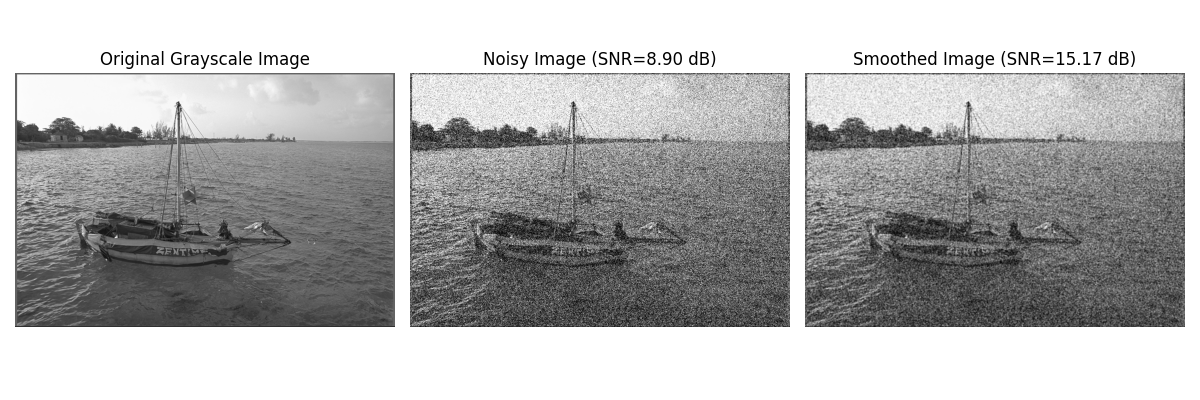
Image:
SNR of noisy image: 8.88 dB
SNR after smoothing: 15.16 dB
SNR improvement: 6.28 dB
Total running time of the script: (0 minutes 0.459 seconds)
