
Standard Interpolation#
Interpolate 2D images with standard interpolation. Compare them to SciPy zoom. We compute SNR and MSE on a face ROI (not the whole frame) to focus on detail and avoid boundary artifacts.
Imports#
import numpy as np
import time

from urllib.request import urlopen
from PIL import Image
from scipy.ndimage import zoom as _scipy_zoom

from splineops.resize import resize
from splineops.utils.metrics import compute_snr_and_mse_region
from splineops.utils.plotting import plot_difference_image, show_roi_zoom
from splineops.utils.diagram import draw_standard_vs_scipy_pipeline


def fmt_ms(seconds: float) -> str:
    """Format seconds as a short 'X.X ms' string."""
    return f"{seconds * 1000.0:.1f} ms"


# You can switch this to np.float64 if you want full double precision.
DTYPE = np.float32
Pipeline Diagram#
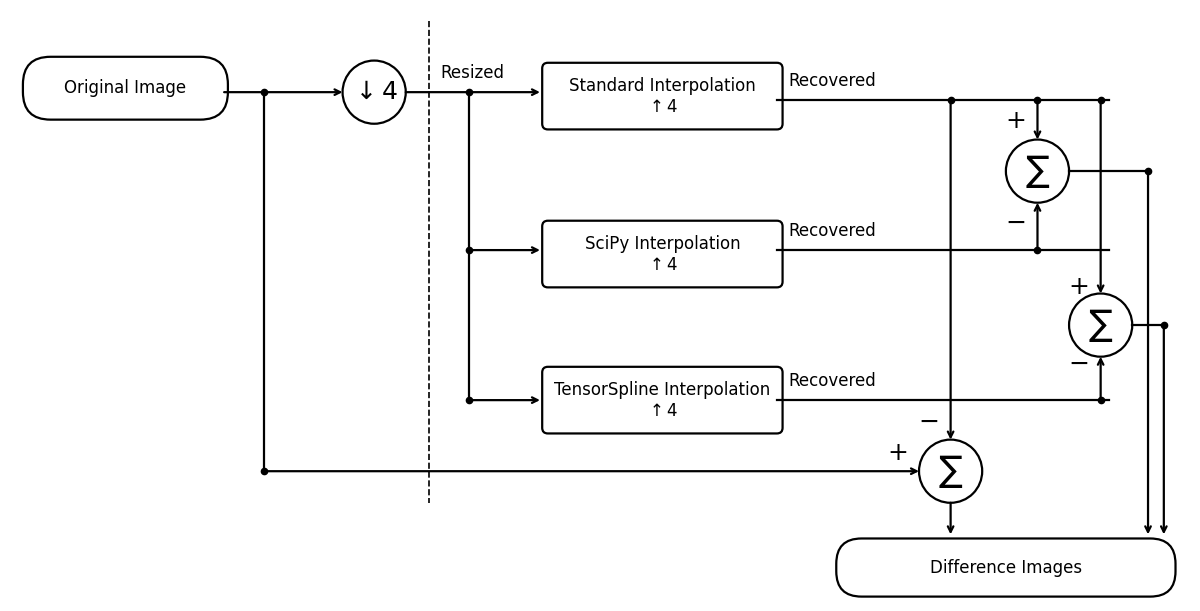
These experiments validate the standard interpolation against SciPy’s by showing they produce (nearly) the same result, and where tiny differences are.
Load and Normalize an Image#
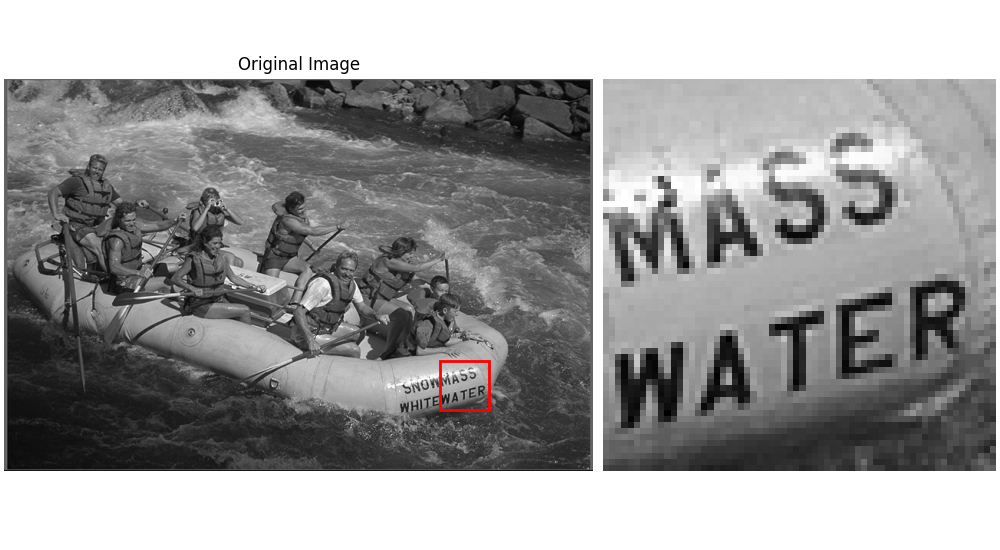
Here, we load an example image from an online repository and convert to grayscale in [0, 1].
url = "https://r0k.us/graphics/kodak/kodak/kodim14.png"
with urlopen(url, timeout=10) as resp:
    img = Image.open(resp)

# Start in float64 for robust normalization, then cast once to DTYPE.
data = np.array(img, dtype=np.float64)

# Convert to [0..1]
input_image_normalized = data / 255.0

# Convert to grayscale via simple weighting
input_image_normalized = (
    input_image_normalized[:, :, 0] * 0.2989  # Red channel
    + input_image_normalized[:, :, 1] * 0.5870  # Green channel
    + input_image_normalized[:, :, 2] * 0.1140  # Blue channel
)

# Run the interpolation backends in DTYPE (e.g. float32 for speed).
input_image_normalized = input_image_normalized.astype(DTYPE, copy=False)

zoom = np.pi / 6  # ≈ 0.5235987756
zoom_factors_2d = (zoom, zoom)
border_fraction = 0.3  # still available as a fallback (unused when roi=... is set)

# Face-centered 64×64 ROI (focus region for metrics & diffs)
ROI_SIZE_PX = 64
FACE_ROW, FACE_COL = 400, 600  # (row, col) approx center of the detail

h_img, w_img = input_image_normalized.shape

# Top-left of the 64×64 box, clipped to stay inside the image
row_top = int(np.clip(FACE_ROW - ROI_SIZE_PX // 2, 0, h_img - ROI_SIZE_PX))
col_left = int(np.clip(FACE_COL - ROI_SIZE_PX // 2, 0, w_img - ROI_SIZE_PX))

# ROI rectangle for metrics/plots (row, col, height, width)
roi_rect = (row_top, col_left, ROI_SIZE_PX, ROI_SIZE_PX)

roi_kwargs = dict(
    roi_height_frac=ROI_SIZE_PX / h_img,  # keeps height at 64 px (square ROI)
    grayscale=True,
    roi_xy=(row_top, col_left),  # top-left of the ROI
)

# Original (shifted ROI)
_ = show_roi_zoom(
    input_image_normalized, ax_titles=("Original Image", None), **roi_kwargs
)
Standard Interpolation#
We use our standard interpolation method (cubic). SNR/MSE are computed on the face ROI.
# Forward + backward resize with splineops.resize.resize
t0 = time.perf_counter()
resized_2d_interp = resize(
    input_image_normalized,
    zoom_factors=zoom_factors_2d,
    method="cubic",
)
t1 = time.perf_counter()
recovered_2d_interp = resize(
    resized_2d_interp,
    output_size=input_image_normalized.shape,
    method="cubic",
)
t2 = time.perf_counter()

time_2d_interp_fwd = t1 - t0
time_2d_interp_back = t2 - t1
time_2d_interp = t2 - t0  # total pipeline time

# Metrics (ROI-aware)
snr_2d_interp, mse_2d_interp = compute_snr_and_mse_region(
    input_image_normalized,
    recovered_2d_interp,
    roi=roi_rect,
    border_fraction=border_fraction,
)
Resized Image#
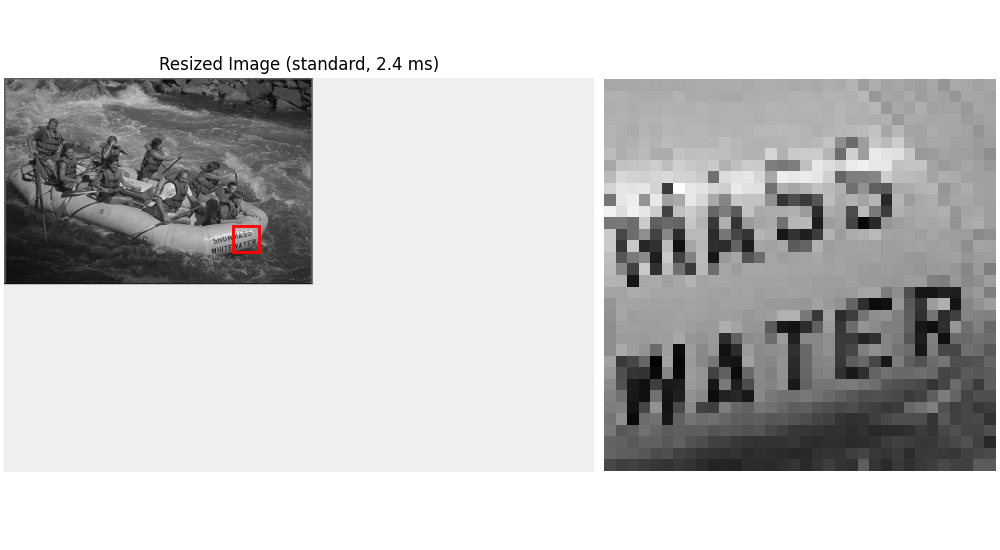
Show the resized image pasted on a white canvas (for zoom-out), plus the ROI zoom.
# Zoomed face detail for the resized (cubic) image pasted onto original-size canvas
h_res, w_res = resized_2d_interp.shape
zoom_r, zoom_c = zoom_factors_2d

# ROI size in the resized image (e.g., 64 -> 16 px when zoom=0.25)
roi_h_res = max(1, int(round(ROI_SIZE_PX * zoom_r)))
roi_w_res = max(1, int(round(ROI_SIZE_PX * zoom_c)))

# ROI center mapped into the resized image
center_r_res = int(round(FACE_ROW * zoom_r))
center_c_res = int(round(FACE_COL * zoom_c))

# Top-left of the ROI in the resized image, clipped to bounds
row_top_res = int(np.clip(center_r_res - roi_h_res // 2, 0, h_res - roi_h_res))
col_left_res = int(np.clip(center_c_res - roi_w_res // 2, 0, w_res - roi_w_res))

# --- Build original-size white canvas and paste the small resized image at top-left (0,0) ---
canvas = np.ones(
    (h_img, w_img), dtype=resized_2d_interp.dtype
)  # white background in [0,1]
canvas[:h_res, :w_res] = resized_2d_interp

roi_kwargs_on_canvas = dict(
    roi_height_frac=roi_h_res
    / h_img,  # keeps the inset square at roi_h_res pixels high
    grayscale=True,
    roi_xy=(row_top_res, col_left_res),  # same coords since pasted at (0,0)
)

_ = show_roi_zoom(
    canvas,
    ax_titles=(f"Resized Image (standard, {fmt_ms(time_2d_interp_fwd)})", None),
    **roi_kwargs_on_canvas,
)
Recovered Image (Standard)#
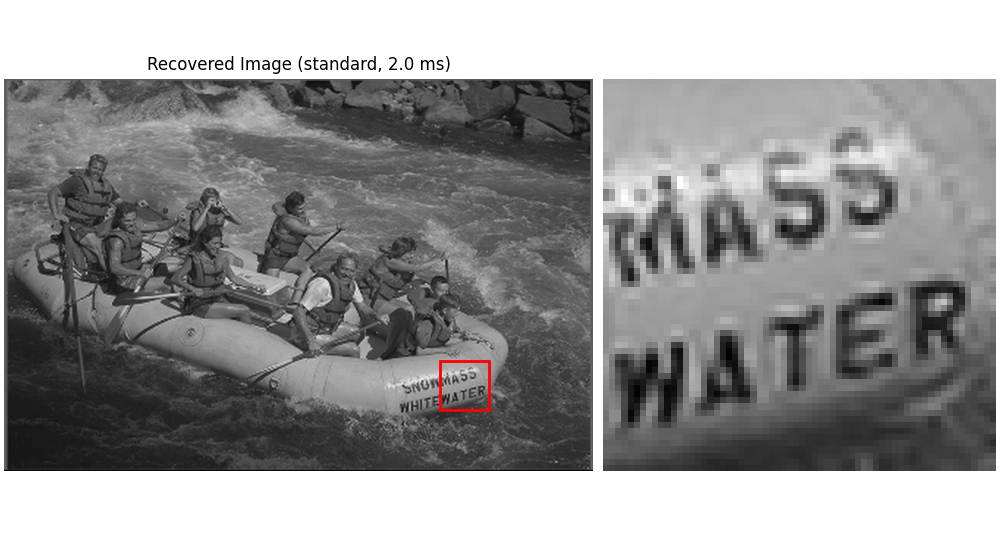
We plot the recovered image (after reversing the zoom) with the same ROI.
_ = show_roi_zoom(
    recovered_2d_interp,
    ax_titles=(f"Recovered Image (standard, {fmt_ms(time_2d_interp_back)})", None),
    **roi_kwargs,
)
SciPy Interpolation#
For comparison, we also use SciPy’s zoom method. Metrics are computed on the ROI. SciPy preserves the input dtype, so it will also run in DTYPE here.
t0 = time.perf_counter()
resized_2d_scipy = _scipy_zoom(
    input_image_normalized,
    zoom_factors_2d,
    order=3,
)
t1 = time.perf_counter()
recovered_2d_scipy = _scipy_zoom(
    resized_2d_scipy,
    1.0 / np.asarray(zoom_factors_2d),
    order=3,
)
t2 = time.perf_counter()

time_2d_scipy_fwd = t1 - t0
time_2d_scipy_back = t2 - t1
time_2d_scipy = t2 - t0  # total pipeline time

snr_2d_scipy, mse_2d_scipy = compute_snr_and_mse_region(
    input_image_normalized,
    recovered_2d_scipy,
    roi=roi_rect,
    border_fraction=border_fraction,
)
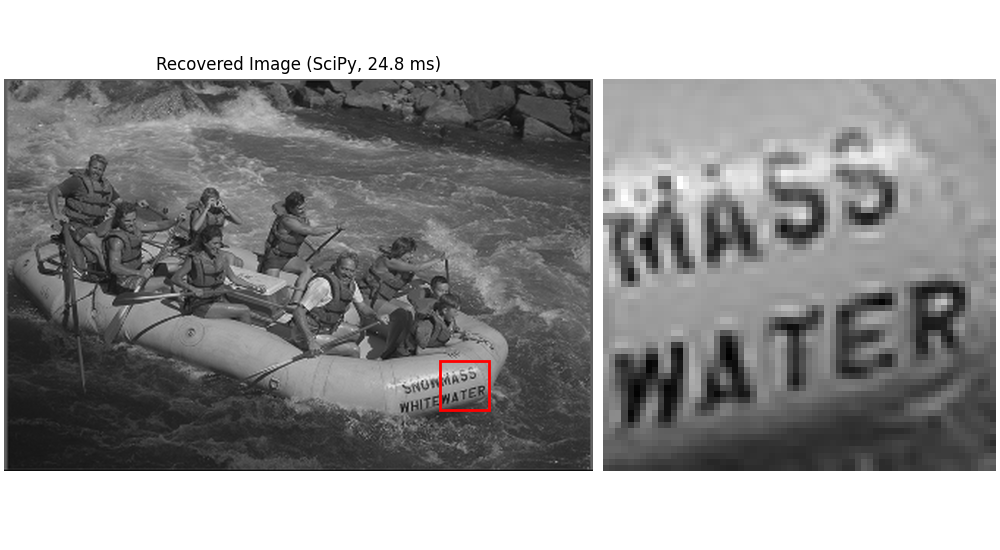
Recovered Image (SciPy)#
_ = show_roi_zoom(
    recovered_2d_scipy,
    ax_titles=(f"Recovered Image (SciPy, {fmt_ms(time_2d_scipy_back)})", None),
    **roi_kwargs,
)
Difference Images#
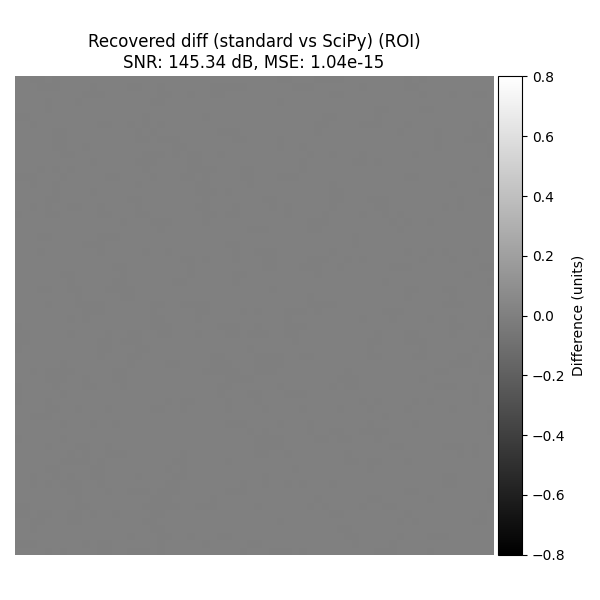
Standard vs SciPy#
Compare the two recovered images on the face ROI and plot that difference.
snr_scipy_vs_interp, mse_scipy_vs_interp = compute_snr_and_mse_region(
    recovered_2d_scipy, recovered_2d_interp, roi=roi_rect
)

plot_difference_image(
    original=recovered_2d_scipy,
    recovered=recovered_2d_interp,
    snr=snr_scipy_vs_interp,
    mse=mse_scipy_vs_interp,
    roi=roi_rect,
    title_prefix="Recovered diff (standard vs SciPy)",
)
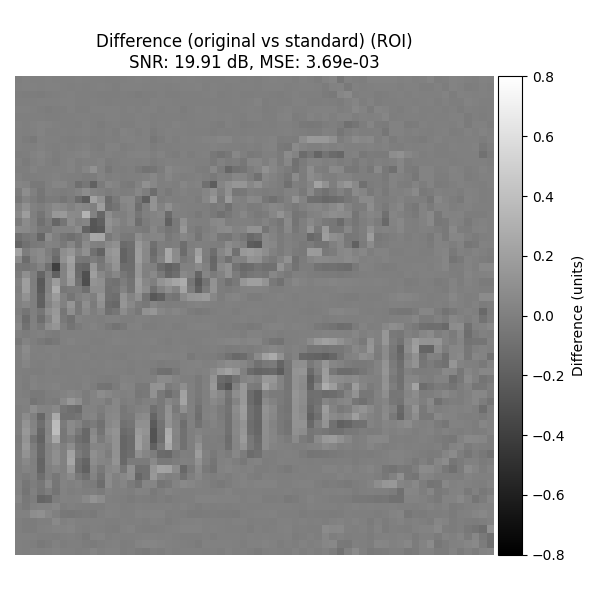
Original vs Standard#
For completeness, show the difference image (original - recovered with standard interpolation) on the ROI.
plot_difference_image(
    original=input_image_normalized,
    recovered=recovered_2d_interp,
    snr=snr_2d_interp,
    mse=mse_2d_interp,
    roi=roi_rect,
    title_prefix="Difference (original vs standard)",
)
Alternative using TensorSpline#
As an alternative, we can replicate the same interpolation manually using the
independent TensorSpline class. It can reproduce this interpolation
configuration, but resize keeps its own specialized implementation.
from splineops.spline_interpolation.tensor_spline import TensorSpline

# 1) Build a float64 spline model and matching uniform coordinate arrays.
# TensorSpline requires construction coordinates and data to share precision.
spline_data = input_image_normalized.astype(np.float64, copy=False)
height, width = spline_data.shape

# Float64 also keeps an intended uniform grid uniform after spacing checks.
x_coords = np.linspace(0, height - 1, height, dtype=np.float64)
y_coords = np.linspace(0, width - 1, width, dtype=np.float64)
coordinates_2d = (x_coords, y_coords)

# 2) For "cubic interpolation", pick "bspline3".
#    For boundary handling, we can pick "mirror", "zero", etc.
ts = TensorSpline(
    data=spline_data,
    coordinates=coordinates_2d,
    bases="bspline3",  # cubic B-splines
    modes="mirror",  # handles boundaries with mirroring
)

# 3) Define new coordinate grids for the "zoomed" shape.
zoomed_height = int(height * zoom_factors_2d[0])
zoomed_width = int(width * zoom_factors_2d[1])

x_coords_zoomed = np.linspace(0, height - 1, zoomed_height, dtype=np.float64)
y_coords_zoomed = np.linspace(0, width - 1, zoomed_width, dtype=np.float64)
coords_zoomed_2d = (x_coords_zoomed, y_coords_zoomed)

# Evaluate (forward pass): zoom in or out
resized_direct_ts = ts(coordinates=coords_zoomed_2d)

# 4) Construct the resized spline on exact integer sample indices, then map the
# original output length onto that index domain. This is the same endpoint
# geometry without using a rounded linspace as a construction grid.
coords_zoomed_indices = (
    np.arange(zoomed_height, dtype=np.float64),
    np.arange(zoomed_width, dtype=np.float64),
)
x_coords_orig = np.linspace(0, zoomed_height - 1, height, dtype=np.float64)
y_coords_orig = np.linspace(0, zoomed_width - 1, width, dtype=np.float64)
coords_orig_2d = (x_coords_orig, y_coords_orig)

# Evaluate (backward pass): from zoomed shape back to original
ts_zoomed = TensorSpline(
    data=resized_direct_ts,
    coordinates=coords_zoomed_indices,
    bases="bspline3",
    modes="mirror",
)
recovered_direct_ts = ts_zoomed(coordinates=coords_orig_2d)

# Now, resized_direct_ts / recovered_direct_ts should be very similar
# to 'resized_2d_interp' / 'recovered_2d_interp' from the high-level "resize()" approach.
# Let's compute MSE to confirm:
mse_forward = np.mean((resized_direct_ts - resized_2d_interp) ** 2)
mse_backward = np.mean((recovered_direct_ts - recovered_2d_interp) ** 2)
print(f"MSE (TensorSpline vs. resize()) resized:  {mse_forward:.6e}")
print(f"MSE (TensorSpline vs. resize()) recovered: {mse_backward:.6e}")
MSE (TensorSpline vs. resize()) resized:  6.058144e-15
MSE (TensorSpline vs. resize()) recovered: 2.140313e-14
Total running time of the script: (0 minutes 1.475 seconds)
